Warning:
Version 2.0 of Pathfinder is undergoing Beta testing. If you would like to be a beta tester - please contact support. It will require a 2.0 key 9 license before you can update to 2.0. It is very important to understand that while all configurations from Pathfinder 1.10.x work in 2.0, changes in 2.0 are often not downgrade-able to previous versions of PathfinderCore PRO. Also note that this document is also in beta form and still undergoing revisions.
Version 2.0.0 11/01/2026 - TBD
Release links not available until release
Beta testers - Find links in Beta Documentation - note: beta testing 2.0 requires a Key9 license upgrade. Contact support if you wish to beta test 2.0.
Pathfinder Core PRO 2.0 is the first major release since 1.10. It includes everything from the pre-2.0 beta work, a redesigned web interface, a new Panel Designer and Logic Flows editor, and Key9 as the only licensing model. The changes below are implemented since 1.10.13.
Web Interface
New dark design. All pages use the Telos dark theme, with consistent buttons, tables, forms and dialogs.
Grouped navigation. The menu is organized into Automation, Devices, Messaging, Routing and Audio, and System. Each section collapses, the whole menu can be hidden for more room, and "Expand all menus" keeps every section open.
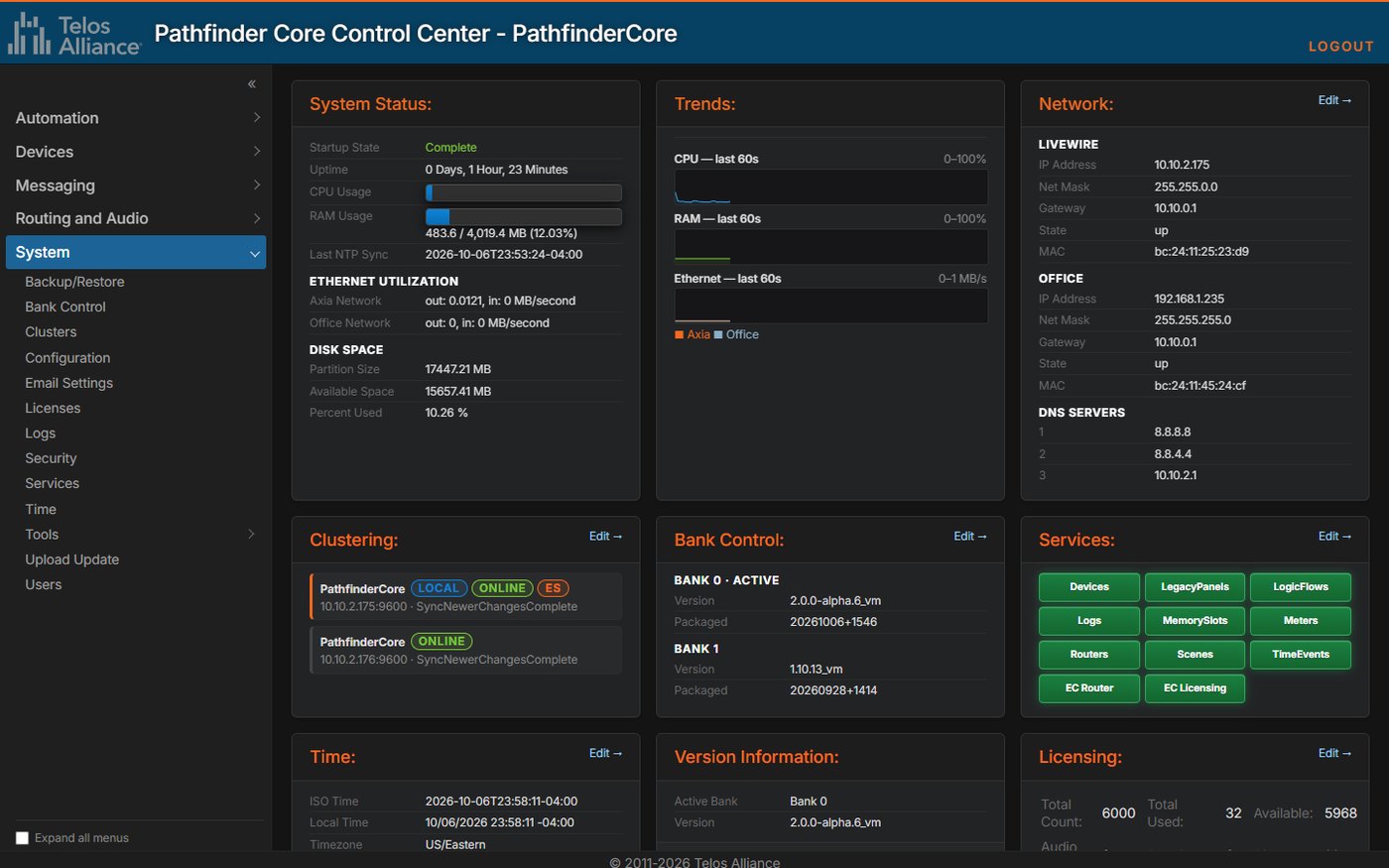
System Status dashboard. Cards for system status, live CPU, RAM and Ethernet trends, network, clustering, bank control, services, time, version and licensing. Most cards link to their settings page. You can drag the cards into your own order.
Services at a glance. Each service is a green or red block, now including the EngineCore router and licensing services. A warning about stopped services appears on every page.
In-page dialogs and editors. Confirmations and messages appear inside the page instead of in browser pop-ups. The editors for memory slots, email messages, log writers, device emulators and audio alarms open over their list.
Bulk actions. Select several rows to delete user panels, backups or memory slots at once, or to clone user panels.
Connection banner. A banner appears when the browser loses its live connection to the system, and again when the connection is restored.
UI Options. Set the banner color, the banner text color and custom banner text, and choose whether the hostname appears in the banner and the browser tab. This makes main and backup units easy to tell apart.
Large systems and proxies. List pages stay responsive with thousands of entries, IP addresses sort numerically, and the interface works behind a reverse proxy or under a sub-path.
Logic Flows
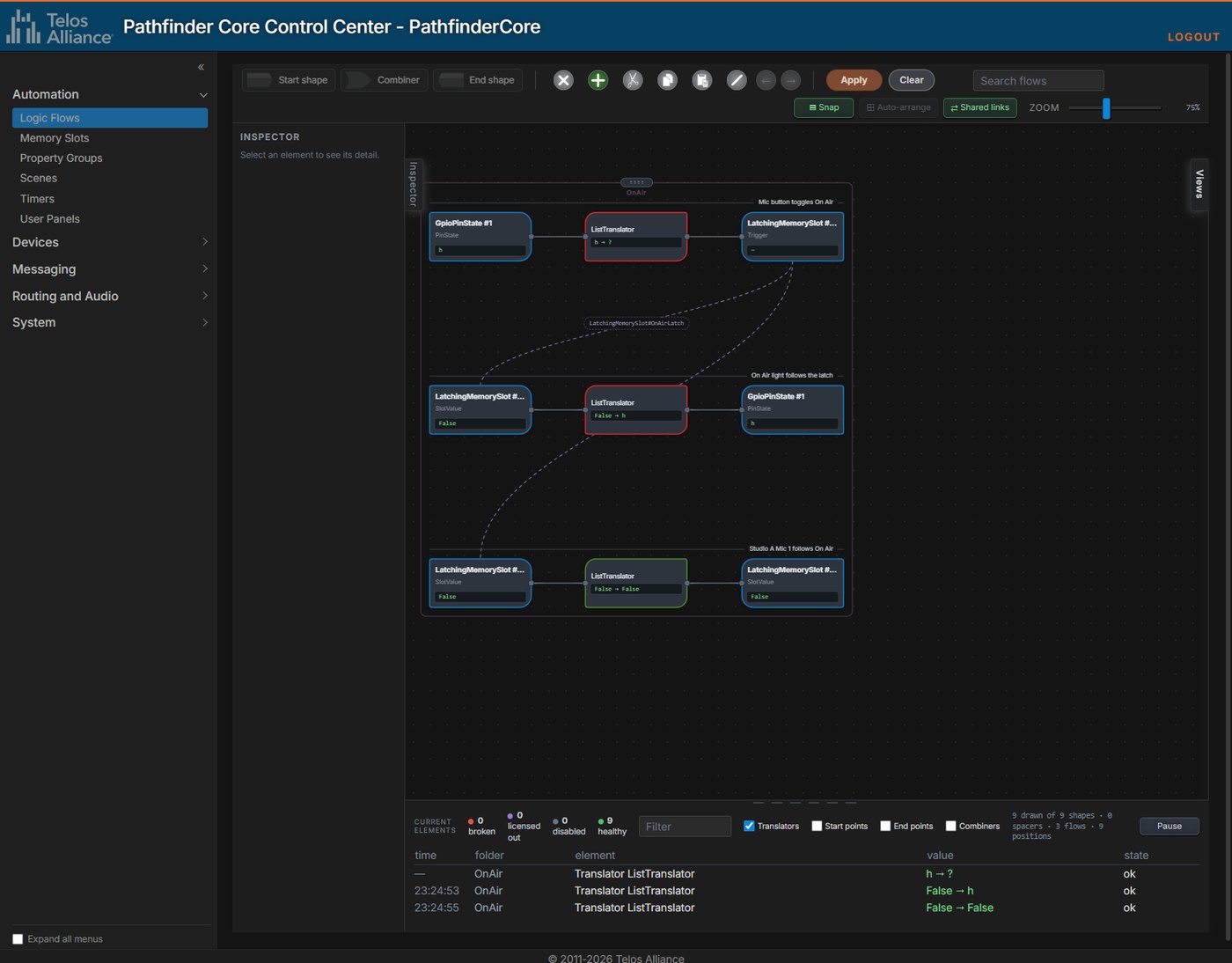
Redesigned editor. Flows are drawn as cards wired port to port. Each combiner's shape shows its logic type, and every start and end card shows its live value.
Free layout. Drag cards, whole flows or a lasso selection, with snap and auto-arrange. Positions are stored on the server, so everyone sees the same layout.
Shared links. When flows write and read the same object, such as a memory slot, a labeled link joins them across flows and folders. Selecting the link highlights everything that uses that object.
Live activity console. Counts of broken, licensed-out, disabled and healthy elements, above a live, filterable list of value changes. Wires pulse as values change.
Inspector, search, undo and zoom. Selecting a card shows its settings in the Inspector. Search dims everything that doesn't match. Undo and redo reach back to the last Apply. Zoom runs from 25% to 400%.
FIFO processing. The new Use FIFO Queue option on translators and combiners processes every input change in order instead of only the latest one. This prevents rare out-of-order results.
Delay bypass values. Inputs matching a delay combiner's bypass values pass straight through without the delay.
Panel binding flows. Panel-generated flows have recursion detection and execution limits. A flow disabled by recursion can be re-enabled from the panel designer.
Folder copy keeps settings. Copying a logic flow folder now keeps each flow's execution limit, recursion check, FIFO and startup options.
Block Execution
Pause parts of the system while it keeps running. Use it for maintenance, testing or troubleshooting.
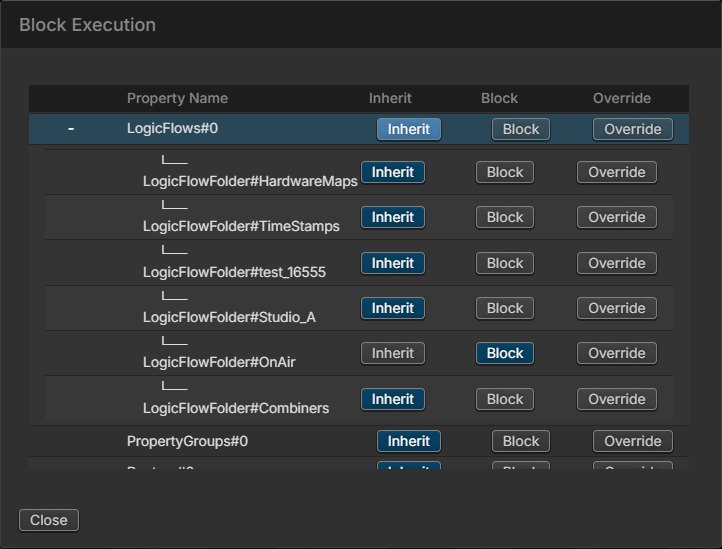
Inherit, Block or Override. Set any logic flow folder, scene, property group, router, timer, user panel or panel page to Block. Items below it are blocked too, unless they are set to Override.
One place to manage it. A Block Execution dialog on the System Configuration page shows the tree of managers and items. Blocked items show in red across the interface.
Scriptable.
BlockExecutionis an ordinary property, so a scene, a panel button or the API can block or unblock items.
User Panels
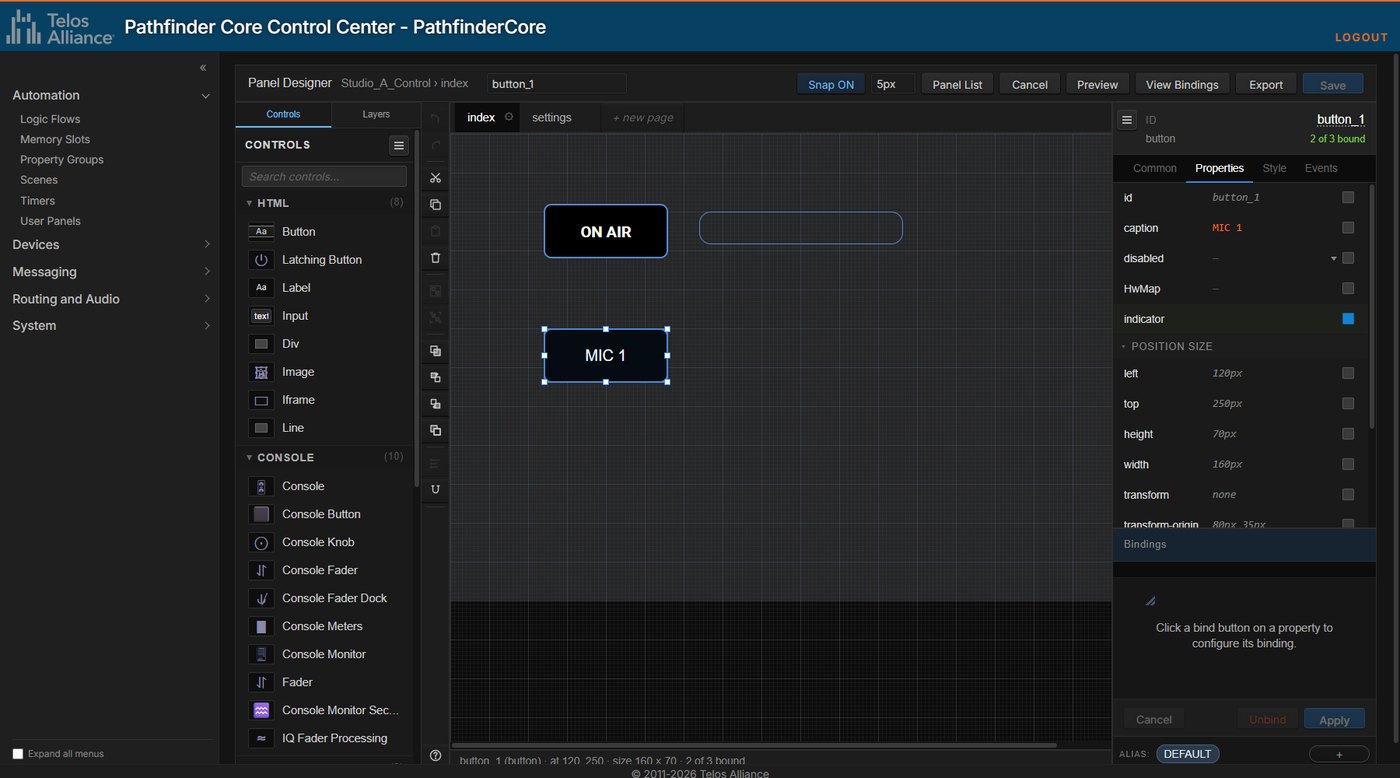
New Panel Designer. A control palette and layers on the left, the canvas with page tabs in the center, and an Inspector on the right.
Faster building.
Snapping, smart guides, alignment, distribution, size matching and a tidy-grid command.
Grouping, layers, cut, copy and paste, and undo and redo.
Editing several controls at once in the Inspector.
Bindings drawer. Bind properties from a side drawer, with searchable pickers for audio sources and destinations, routers, gain controls, calendar resources and hardware buttons. View Bindings lists every binding on a page.
Autosave and recovery. The designer saves drafts in the browser and offers to recover them. It also has Preview and a "Jump to element" search.
Button aliases. A control can hold several aliases, each with its own properties and bindings, chosen at run time. Hardware buttons follow the active alias.
New controls. A latching button, a line control with rotation, and pickers for images and web pages.
Custom themes. Create, edit, clone and delete themes. A binding can switch a panel's theme while it runs.
Export and import. Export a panel, with its pages, images and themes, to a file and import it on another system. You choose how name clashes and bindings are handled.
Blocked panels in red. Execution-blocked panels and pages are shown in red in the list and in the designer.
Compatibility. Panels saved in 2.0 can't be opened by 1.x.
Memory Slots
Array memory slots. A new type that holds member slots of any type, including nested arrays. Subscribing to the array delivers every member, and the list shows arrays as an expandable tree.
Numeric operations. Numeric slots gain write-only Round, Floor, Ceiling, Multiply, Divide and DivideRound properties.
Current and startup values. The startup value can now be changed, and the current value can be set from the list without changing it.
Clone and bulk delete from the list, plus a tidier editor and faster changes on large systems.
Scenes
Authoritative scenes. A scene can keep reasserting its values, with a retry interval.
Read-only scenes. These can't be activated or edited from the interface, logic or API.
Item mutability. Each item is read-only, read/write or write-only. This decides whether the item executes on activation and whether it counts toward IsActive.
Disable items and change values. Individual items can be disabled without deleting them, and logic can change an item's value with
ChangeValue.Execution limits on scenes.
Property Groups
Object groups. Pick object paths and properties, and Pathfinder creates and maintains a redundancy or synchronization subgroup for each matching object. View Subgroups shows their live state.
Disable groups and items. A disabled group stops working, and disabled items are left out of the group's logic.
Execution limits on property groups and synchronization masters.
Routers
Several Axia audio routers. Split audio sources and destinations between routers by IP range, using Auto Insert Limits. Axia GPIO routers support limits too, and audio alarms and panel pickers let you choose the router.
Object routing. SAP property routers can route whole objects, such as vMix sub-objects, with object clear values.
Router commands.
ExecutePatternmakes routes by pattern (ClearAll, LeftToRight, OneToAll, LastToAll).LockUserAllandUnlockUserAlllock or unlock a whole router.PulseAllSourcesandPulseOnMountre-send source values, on demand or when the router finishes starting.
Clear values follow changes. A cleared destination re-sends its clear value when logic changes that value.
Blocked routers. A router blocked by Block Execution refuses route changes and is marked in red. Each router's tables now keep their own filter and sort.
Devices and Emulators
REST API authentication with JWT. REST API devices support static or dynamically fetched bearer tokens, with header or body placement, including Triton Station Manager.
Fewer false "device offline" events. Poll timeouts now measure real activity and allow for load during startup, cluster sync and failover. New diagnostics show suspected and confirmed timeouts.
More reliable connections. The reconnect logic has been reworked. A device reports logged in only once all of its connections are, and the Recycle button now also resets the device's meter connections.
Quasar Vmix inputs. The Quasar's AUX SEND 5–8 and TALKBACK can be selected as Vmix inputs.
Device emulator handshake. TCP client emulators can wait for a success reply, with wait times, and reconnect if it doesn't arrive. A new Recycle button restarts an emulator's connection.
Node emulator port. The node emulator can listen for LWRP on a port other than 93.
Audio Alarms and Vmix Control
Per-IO alarm thresholds. Silence and clip levels can be overridden for each audio IO. Every other IO follows the system-wide setting.
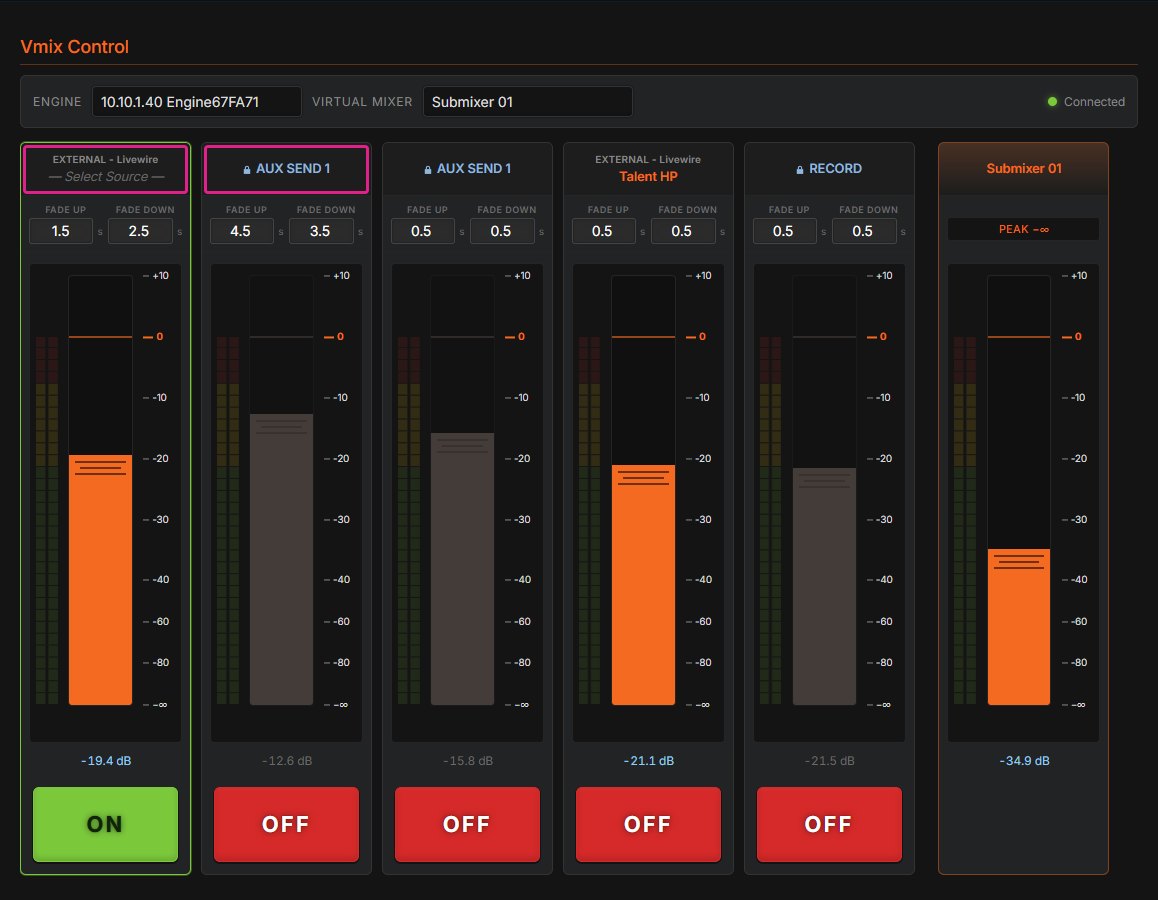
Redesigned Vmix Control.
A five-strip mixing surface with a master strip, scaled to fit the window.
Combined fader and meter bars, faders that only move by their grip, and fade-up and fade-down times.
A connection indicator.
Internal and external Vmix sources. Each input can take an external Livewire source or one of the engine's own internal sources, such as a program, record or phone bus, or an aux send. The fader locks while an internal source is in use.
Clusters
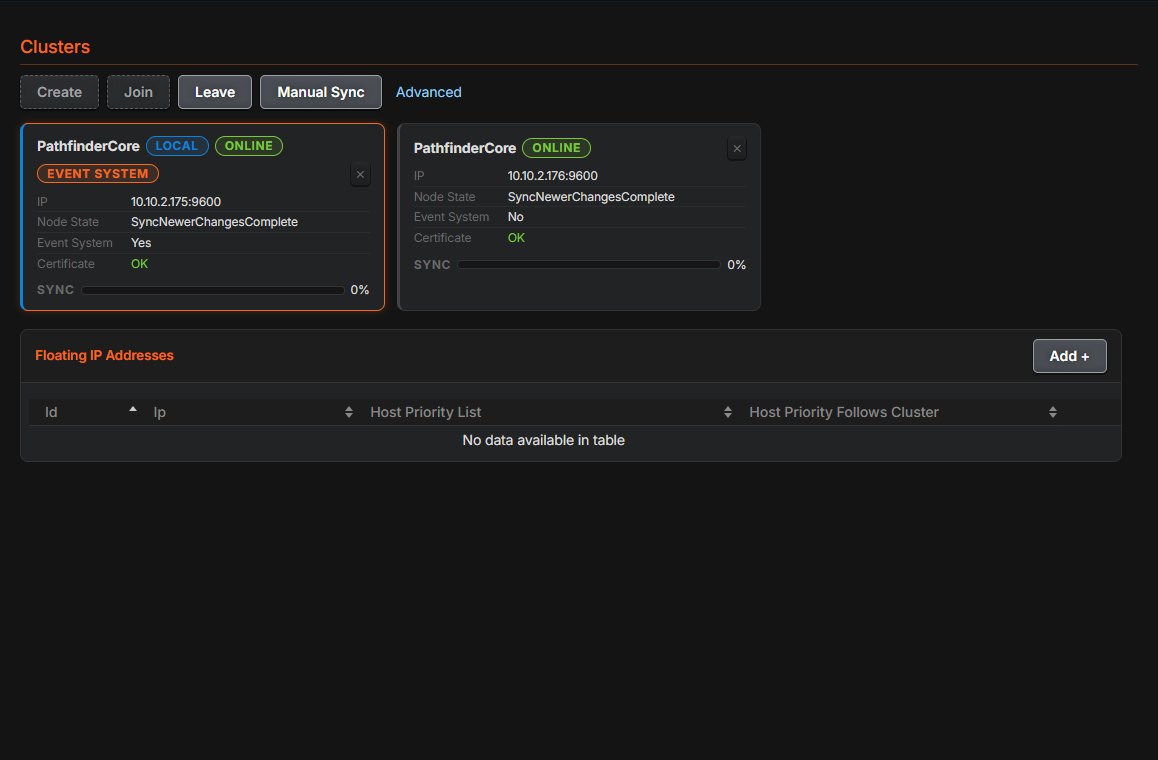
Node cards. Each node is a card showing its state, whether it runs the event system, certificate trust (with a link to review a failure) and sync progress. Floating IPs have their own panel.
Override Primary. Choose which node runs the event system. A floating IP can follow that choice with Host priority follows cluster.
Backup license grace. A backup node's inherited license is enforced for 90 days, with a warning at 60 days and an error at 80. A node that leaves the cluster falls back to its own license.
Cluster-wide Block Execution. See Block Execution above.
Users and Security
Security Groups. Rights (administrator, route locking, menus and allowed APIs) are now set on named groups, and each user belongs to a group. Upgraded systems keep each user's existing rights.
LDAP and Active Directory groups. A directory group maps directly to a security group of the same name, so placeholder users are no longer needed.
Emergency Access. Users marked for Emergency Access can log in at
/emergency/with their local password when LDAP or Active Directory is unavailable.Safeguards. Changes that would leave no administrator are refused, and user names that differ only by letter case are rejected.
Smaller improvements.
IP white list entries can have a description.
A failed LDAP test shows the real reason.
Factory default clears users and groups.
TLS hardening. TLS 1.0 and 1.1 are disabled, and each unit gets its own certificate export password.
Logs
One row per log. Rotated files are grouped under their log, with View, Tail, Download and Delete/Clear for each.
Live tail. Watch new lines arrive as they are written.
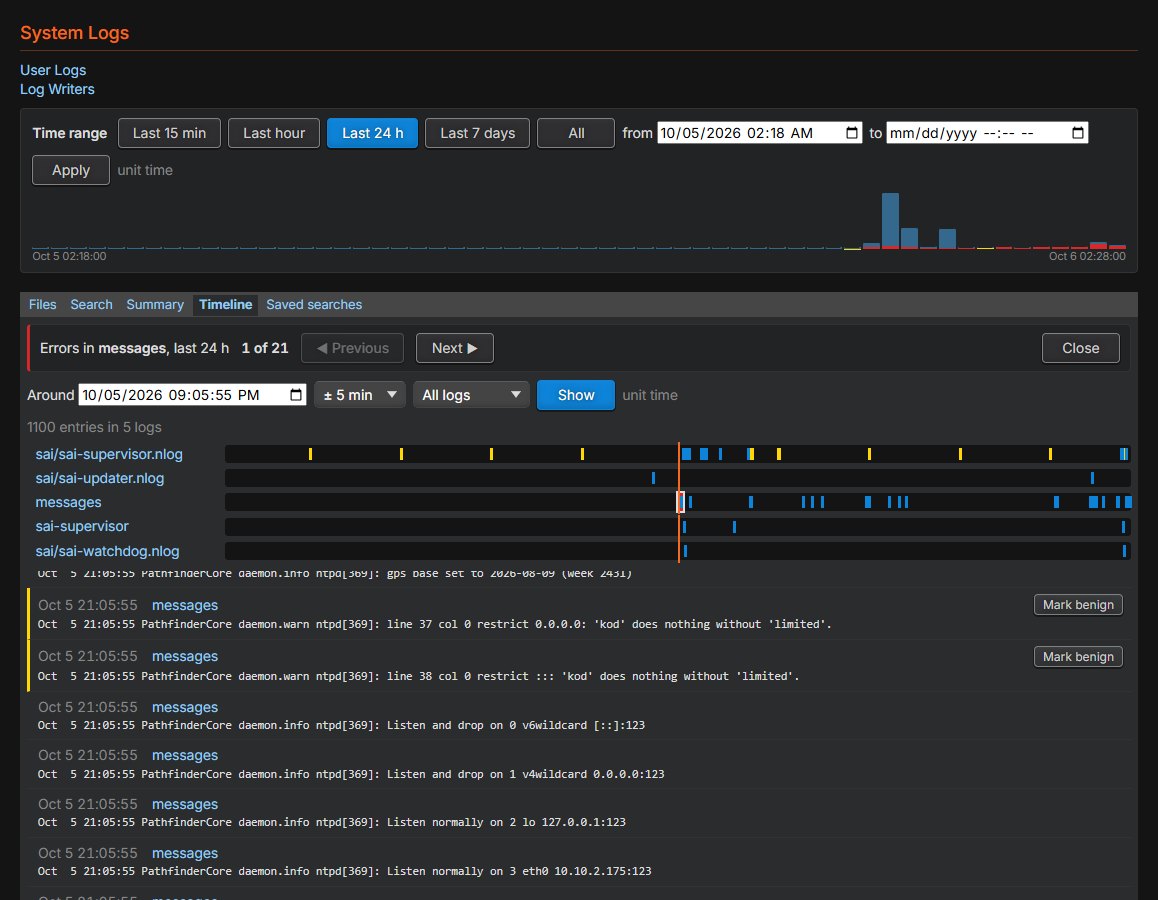
Search across logs. Multiple criteria, regular expressions and context lines, within a time range shown as a histogram. Searches can be saved, and saved searches show how many new matches there are.
Summary and timeline. The summary lists the most repeated problems, dropped devices and service restarts. The timeline shows every log's entries around any moment.
Benign marks. Expected warnings can be marked benign so the error counts show only what needs attention. Error and warning counts step you through each entry.
Support bundle. One click saves the logs for a time range, with a summary, to send to Telos support. Keys are removed.
Backups
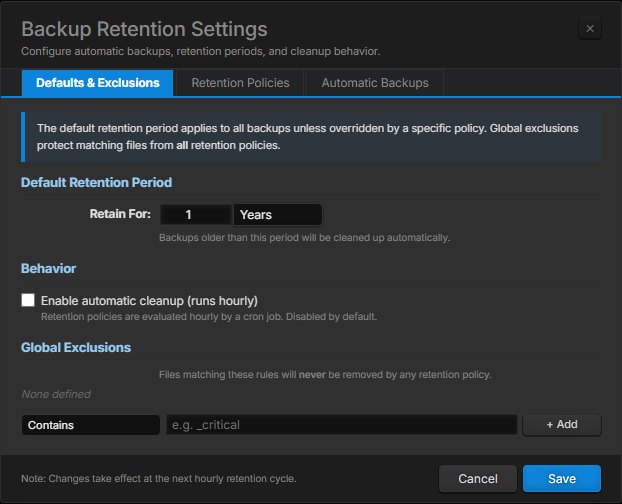
Retention policies. Remove old backups automatically by age, by file name, or both, with exclusions for backups that must be kept.
Automatic backups. Take backups on an hourly, daily, weekly or monthly schedule.
Redesigned dialogs. Create, upload and restore have been redesigned, including drag-and-drop upload and a clear choice of what to restore.
Certificates included. Backups now include the web server certificate and trusted root certificates.
System and Network
Static routes. Add and remove static IP routes from the Configuration page.
Net Tools. Run ping, netstat, nslookup, traceroute and telnet from the unit, in the browser.
Readable Advanced Options. Options are grouped by area, show their defaults and mark changed values. The plain-text editor is still available.
Bank Control and updates. Each software bank is a card, and Restart is enabled only after you select the other bank. The update upload page shows its progress.
Licensing
Key9 only. Key9 licensing arrived in 1.10.12. 2.0 uses Key9 license keys and no longer uses the legacy license files. A unit moves to 2.0 by updating to 1.10.12 or later and adding its Key9 license there first.
License server status. Every configured license server is checked, and each is shown as connected or not.
Offline activation is offered only on hardware units, where it applies.
Factory licensing. New units can leave manufacturing with their license installed, ready to activate on first use.
Container
Production container. Pathfinder Core PRO can run as a Docker container on a Linux host. The image is based on Ubuntu 24.04, includes EngineCore and Key9 licensing, and keeps configuration, backups and logs in persistent storage.
Host or bridge networking. Host networking supports Livewire. With bridge networking the ports can be moved, and the Livewire and office interfaces can be named.
Certificates and LDAP. The container can supply its own web certificate, rebuilds trusted root certificates at start, and supports LDAP over TLS.
Container-aware interface. Network, time, Bank Control and Upload Update pages are hidden because the host manages them. Status shows the container's own uptime and resources, and a restart recycles the container.
SAPv2 API
SET across many objects. A SET with
$MAX_DEPTHchanges the property on every matching object below the path. For example, one command can turn off every GPO.$SETID. Tag a SET request, and the same ID comes back on the resulting change. This suits synchronization tools.New properties for every feature above, including
BlockExecution,UseFifo, array slots, scene mutability, router pulse and pattern commands, and per-server license status.
Reliability and Performance
Faster logic startup on large systems, and no more startup hang on systems without flows.
Lighter memory slot changes on systems with many slots.
Watchdog. Restart escalation resets once the system proves stable.
Cluster licensing fixes. A backup node that starts before the primary now loads its devices, and a restarting primary no longer tells its backups they have no license.
Robustness. A dropped browser connection can no longer crash the core service, and log delete and clear work again.
Alpha/Beta Tester Release Notes
Version 2.0.0-rc1 11/17/2026
Alpha/Beta Versions
Please review the feature changes in the 2.0 release (marked TBD until release) for the new features of 2.0. The release notes here are for the alpha/beta users to to know what has changed since the end of the beta testing period.
Warning this is a release candidate version and not a full release version yet.
Notes about 2.0 versioning:
2.0 will be a free upgrade for existing vm and hardware users when it becomes available, but will require an update to a key9 license.
Running the containerized version of 2.0 requires a key9 license.
New features added after 2.0 will also require a current SLA.
WARNING: You cannot use these downloads until you have a key9 license in place on your existing 1.10.x system. Contact support if you want to become a release candidate tester.
Version 2.0.0-rc1 (R2 Platform - 1RU)
Version 2.0.0-rc1 (X13 Platform)
Version 2.0.0-rc1 (Virtual Machine)
Release notes:
Changes From 1.10.xx
All changes up to 1.10.20 are also included in this release
Logic Flows
The logic flow editor now opens at 100% zoom on a browser that has never used it. A browser left at another zoom level keeps it.
Disabling or enabling a flow now shows on the flow immediately. Previously the flow kept its old appearance until something else redrew the page.
Fixed the property selector showing the wrong list of properties after switching between a start point and an end point. An end point's write-only properties (such as a memory slot's Append) could appear for a start point, and the other way round, until the page was reloaded.
Improved Place Right, Place Left, Place Above and Place Below when adding a flow beside an existing one:
The existing flow stays where it is and the new flow lands beside the card it was added from.
Place Below inserts the new flow next to the flow that was clicked, not at the bottom of the stack.
Place Left moves the clicked flow and everything connected after it together.
Place Above on a flow at the top of the screen moves that flow down to make room, so the new flow no longer lands off-screen.
Flows that have never been dragged no longer shift when a flow is added beside them.
Fixed flows built around a relay or logic gate where the relay could be drawn several rows above its inputs and output, and where a new flow added from the end shape landed in the far left corner.
Positions changed in another browser or on another cluster node now appear without reloading the folder.
Fixed flow positions being lost on the other cluster node when a flow was moved after it was saved, or created and placed in a single save.
Fixed Auto Arrange on one cluster node stacking the cards in the top left corner on the other nodes.
Snap is now finer (a tenth of a cell), and the background dots match the snap positions.
The Inspector tab now sits at the top of its edge, matching the Views tab, and no longer covers the first card of a flow beside it.
User Panels and Panel Designer
Latching buttons – option groups: Latching buttons can now be given an Option Group in the designer. Buttons that share a group behave like radio buttons: latching one releases the others.
Latching buttons: Fixed every other press being ignored in some cases. A change made elsewhere now shows on the button without a refresh.
Latching buttons: The separate latched and unlatched events have been replaced by a single latched change event that carries the new state, so one binding handles both directions. Panels made with an earlier 2.0 beta that bind the old events need to be re-bound.
Layers panel redesign: Each layer is colour coded and always shows its controls. Click anywhere on a layer's row to make it active, double-click to show only that layer, and use the header button to show or hide all layers. Controls can be dragged into or out of a div from the layers list.
Controls with visibility set to hidden now stay visible (dimmed) and selectable in the designer, along with their contents. They are still hidden in preview and on the live panel.
Clocks, meters, faders, gauges, latching buttons and other custom controls now offer the standard style properties (visibility, position, size, colour, font) in the inspector.
A fader inside a hidden div is now hidden on the live panel.
New and pasted controls land on the active layer. A control added or pasted onto a div becomes part of that div.
The "Divs can't be nested" warning no longer appears for a div that overlaps one on a different layer.
An enabled binding is now removed with the Remove Binding button and can no longer be unticked by accident.
Fixed some panels opening partly hidden behind the controls and layers pane in the designer.
Removed the Visibility Scope, Visible On and Visible Off control properties. Visibility can be bound directly. Existing panels are not affected.
The Themes tab now supports selecting several themes to clone or delete, as the Panels tab does.
Meters: A panel now only requests metering data for meters that are actually on screen, and stops when a meter is hidden. This reduces metering traffic on panels with many meters.
Logs
The Logs page has been reorganised. It is now a single list of logs with a toolbar for the time range, search, summary, timeline and saved searches. Each log has a View button, with Tail, Download and Delete under a menu.
The warning and error tags now follow the selected time range and match the chart. Previously they always counted the last 24 hours.
Clicking a bar on the chart now opens the timeline showing the whole of that bar.
Clicking or dragging on the timeline moves the cursor and updates the Around time.
Fixed alignment problems in the log writer editor.
Timers and Calendar
The timer, calendar, resource and template lists now fit the window, so edit, delete and Add stay on screen.
The timer, calendar, resource and template editors are wider and laid out as clear label and field rows.
The calendar has a Dark / Light switch, remembered per browser. Light matches the look of the 1.10 calendar.
In the Day view, a calendar with more resources than fit now scrolls sideways instead of squeezing the columns.
Routers and vMix
Router XY grid: The crosshair is now grey with white names, and only the box under the pointer is orange, making it easier to see which crosspoint will be selected. The grid now fits the page without a second scrollbar.
Router details: The Advanced link has moved to the Points tab and opens an Auto Insert Limits dialog.
vMix Control: The Select Source dialog now opens on Internal for an input the engine feeds itself, with that source selected, and on External otherwise. All external inputs are now marked EXTERNAL.
Lists and General Interface
Delete Selected: Scenes, property groups, timers, calendars, resources, templates, devices, device emulators, routers, audio alarms, email messages and log writers now have row checkboxes and a Delete Selected button, as memory slots and user panels do.
Memory slots: The in-place edit icon is now a pencil in front of the value, and the edit and clone links match the other lists.
Users: The Edit User and Edit Security Group dialogs have been tidied. In the security group dialog the Save and Cancel buttons stay in view.
System Status: The page now fits a 1080p screen without scrolling.
Pages and dialogs now show a scrollbar only when there is something to scroll to. Content is no longer cut off at the right edge of some dialogs.
The interface font now ships with the product, so the interface looks the same on a system with no internet access.
Updates
The license agreement is now only presented again after an update if its text has changed.
If an update fails, the updater log now records what the update did and why it stopped.
Security
SSH auto-disable: SSH now turns itself off 48 hours after it is enabled. The Security page shows a countdown while SSH is on. Disabling SSH now also ends any open SSH sessions.
Updated packages for security purposes.
Container Deployments
Fixed floating IP addresses in container deployments.
Removing a floating IP now shows a wait dialog until the removal is complete.
Updated the container image base image.
Important container note. For clustered containers that need floating IPs, the following section should be added to the docker file:
    # May be removed if not using Floating IP management
    cap_add:
      - NET_ADMIN
      - NET_BIND_SERVICE
      - NET_RAW
Version 2.0.0-beta.3 10/31/2026
Alpha/Beta Versions
Please review the feature changes in the 2.0 release (marked TBD until release) for the new features of 2.0. The release notes here are just for the select alpha/beta users to have a changelog between alpha/beta versions. Links will only be present in this document once we reach release candidate stage.
Warning this is a beta preview version and not to be distributed to customers without express permission.
Notes about 2.0 versioning:
2.0 will be a free upgrade for existing vm and hardware users when it becomes available, but will require an update to a key9 license.
Running the containerized version of 2.0 requires a key9 license.
New features added after 2.0 will also require a current SLA.
Pre-Release notes:
Changes From 1.10.xx
All changes from master branch up through 1.10.17
Important Notes Before Upgrading
You will be asked to review your Admin password and accept the End User License Agreement after upgrading. If the unit is still using the factory default Admin password, you will be taken to a security page the first time you sign in. You can set a new password there, or confirm that you want to keep the default. You will also be asked to accept the EULA once. Both questions are asked again after each software update.
New installs no longer have a default password. The first time you browse to a newly installed or factory-defaulted unit, a setup page asks you to create the Admin password and accept the EULA before anything else is available. Using Reset Security from the front panel or console also clears the Admin password and returns the unit to this setup page. Other user accounts are kept.
The PDM device type has been removed from the Add Device dialog. A PDM is now added as a regular LWRP device. See "Changes" below.
Security
Includes all updates from 1.10.15
New Features
First-run setup page. New and factory-defaulted units start at a setup page where you create the Admin password and accept the EULA.
EULA and Software Bill of Materials. The version card on the System page now has EULA and SBOM links. Each one opens a read-only view that you can print. The SBOM lists the software components included in the unit, grouped by type, and you can search it and expand or collapse each group.
NTP not synchronized warning. A banner now appears when NTP servers are configured but the unit has not been able to sync its clock with them for more than a minute. Previously, a banner appeared only when no NTP servers were configured.
Startup status shows what it is waiting for. While the unit is starting up, the System Status page now lists the services that startup is still waiting on, as well as the current startup stage.
Logic Flows: full undo and redo. Undo and redo now cover every change you make to a logic flow, including property edits, deletes, paste, combiner type changes and relay input swaps. Before, they only covered some changes.
Logic Flows: moves wait for Apply. Moving a card or a flow, and using Auto-arrange, now works like any other edit. The change shows on screen right away, and it is saved when you press Apply. Pressing Clear puts back the last applied layout.
Improvements
Logic Flows
You can now place flows anywhere on the canvas, including right next to each other. A flow no longer jumps away from where you dropped it.
New flows are placed closer to the flow above them.
Links between flows that share an object are easier to follow. They leave from the side of a card that faces the other flow and curve through the open space between flows, so they no longer loop around or behind other cards.
The connecting line between cards in a flow is shorter, so flows take up less space.
Card names stay readable when you zoom out. Long names wrap to a second line before the text gets smaller.
Cards grow from their center when you zoom out, so their connection points and links stay in place.
The snap setting is remembered when you reload the page.
The zoom slider now goes up to 200% (previously 400%).
The icons in the Views pane are larger.
Using the right-click menu to align or space several flows now moves the flows correctly, and you can undo it.
General
The main navigation pane is narrower, so pages have more room.
On the Edit Licenses page and in license messages, "SLA" is now called TelosCare.
Admin passwords can now be any length. If you enter an empty password or the factory default, you will see a warning, but you can still continue.
License messages now go to their own Key9 system log, and EngineCore process messages go to their own EngineCore system log. This keeps the main Supervisor log easier to read. You can view both new logs on the System Logs page.
SupportLink now gets current connection details every time it starts, so it can reach the Telos support server.
Licensing
A unit's licensing node name now stays the same after a restart.
Changes to the cluster password are now picked up without a restart.
Changes
Adding a PDM. The Add Device dialog no longer offers PDM as a separate device type. Add a PDM as an LWRP device. If you enter the address with the PDM port (for example
192.168.1.50:5443), the PDM control connection is turned on automatically. If you enter it with port 93, it is added as a standard LWRP device. Existing PDMs are not affected, and you can still edit a PDM's connections as before.
Bug Fixes
Fixed an issue where choosing to keep the default Admin password still sent every page back to the security update page, so the unit could not be used.
Fixed an issue where changing the Admin password back to the default asked you to accept the EULA again.
Fixed an issue where you could accept the EULA from the System page without ticking the acceptance box.
Fixed an issue where changes to the NTP server list did not take effect until the unit was restarted.
Fixed an issue on X13 units where LDAP sign-in did not work. Units using local sign-in were not affected.
Fixed an issue on fanless units where SSH access could fail to start.
Fixed an issue where flows that were moved before being applied for the first time lost their position and reloaded stacked in a single column.
Fixed an issue where, after you added a translator, combiner or end shape in Logic Flows, your next click selected the whole flow and disabled the add tools.
Fixed an issue where the Panel Designer endpoint tree did not load.
Fixed an issue in Panel Designer 2 where a large panel could open with its left edge hidden behind the controls pane.
Fixed an issue where new installs did not send backup sync warnings before a backup's inherited license expired.
Beta.3 specific
Logic Flows
Flow shapes no longer grow taller to fit their text. Every card now keeps a fixed height, and text that's too long is trimmed with an ellipsis instead of wrapping.
Start and end shapes always split their name across two lines — the part before the # on top, the part after it below (the # is dropped) — so endpoint labels stay readable.
A property and its value now always sit together on one line.
New Zoom Calibration item on the canvas right-click menu: a short modal explains the zoom setting and lets you change it. The value is saved per browser, so the same person can run the site on two computers with different settings.
Editor polish: better top spacing, cleaner endpoint placement, a right-click menu, and Place at side.
NTP warning banner
The banner now runs the full width of the screen instead of sitting in a card-sized box.
You can now dismiss it permanently. Once dismissed, it stays hidden on every page, remembered per browser. Clearing browser cache will reset this value.
Support Link
The serial number no longer shows an error on container builds.
Fixed the button text overflowing its button.
Added a friendly name to the Support Link dialog.
Containers
The hostname Edit button is now hidden on container builds, where the hostname isn't editable.
Version 2.0.0-alpha.10 10/17/2026
Alpha/Beta Versions
Please review the feature changes in the 2.0 release (marked TBD until release) for the new features of 2.0. The release notes here are just for the select alpha/beta users to have a changelog between alpha/beta versions. Links will only be present in this document once we reach release candidate stage.
Warning this is an alpha preview version and not to be distributed to customers without express permission.
Notes about 2.0 versioning:
2.0 will be a free upgrade for existing vm and hardware users when it becomes available, but will require an update to a key9 license.
Running the containerized version of 2.0 requires a key9 license.
New features added after 2.0 will also require a current SLA.
Pre-Release notes:
Licensing
The License page now explains why a license key isn't valid. Each key and feature shows one status: Valid, Expires soon, In extension, Expired or Blocked for this version. A short line below the status says what it means for your system.If your support agreement (SLA) has ended, nothing that's already running stops working. It only prevents you from installing newer software versions.
Dates now take into account any extension granted by the Telos license server, and the SLA row reads "Extended to" while an extension is active.
License renewals now appear on the License page, and on the other Pathfinders in a cluster, without reloading the page. Refresh Licenses now waits up to 20 seconds for the license server to respond.
Fixed a bug where Pathfinder could accept a software update that would then disable its own license because the SLA didn't cover that version. Updates your SLA doesn't cover are now refused up front.
Fixed a bug in container installs where an ended SLA could turn off the license of the version already running.
Scenes
Fixed a bug where two scenes fired close together could finish with the older scene's settings instead of the newer one's. This mainly affected setups where several scenes control the same group of items. The most recently fired scene now always wins.
Improved performance when many scenes fire in quick succession. Before, every scene waited for all the others to finish. Now a scene only waits for scenes that change the same items.
Audio Alarms
Fixed a bug where audio alarms (silence and clipping) didn't keep all their settings when Pathfinder restarted. An alarm you had disabled would turn itself back on, and on systems with more than one Axia router, the alarm's router selection went back to the first router. This affected every 2.0 alpha release, including alarms carried over from a 1.x upgrade. After updating, check that any alarms you had disabled are still disabled, and re-select the router on any alarm that should use a router other than the first.
Device Connections
Faster detection of a Livewire device that fails or loses its connection in the middle of a reply. These failures used to take an extra 45–75 seconds to show up. They're now detected on the normal schedule.
Web Interface
The Reboot button on the System page now reports a reboot that fails to start, instead of counting down as if it had worked.
When the browser loses its connection to Pathfinder (for example after the computer wakes from sleep or changes networks), you now see a single "lost connection" banner and Pathfinder reconnects automatically. You no longer get a separate "service offline" message for every service.
Fixed false "service offline" messages that piled up in a browser tab left in the background and appeared when you returned to it.
The User Panels page now puts Panels and Themes on separate tabs.
The panel list now waits until all panels have loaded before it appears. It no longer shows up partly filled and redraws as each panel arrives.
UI Options: if saving fails, the error message now says why, for example a file permissions problem.
Factory default now resets the banner to the standard navy and white, the same as a new install. Before, it reset to dark gray and orange.
The banner text and colors can now be changed from Logic Flows or through the API (SAP). They're available as System properties: BannerText, BannerBackgroundColor and BannerTextColor.
Calendar Resource Display widget
The event that's currently running is now shown in that event's own color instead of always green.
The running event now shows a countdown of the time remaining (hh:mm:ss). You can turn the countdown off with the new countdown setting.
Panel Designer (Designer2)
Preview now opens in a pop-up window sized to fit the panel, as the original designer did, instead of in a new browser tab.
Fixed a bug where a console control didn't redraw correctly after it was resized.
New controls can now be dropped right against the left and top edges of the panel, and they land exactly where the drag preview shows them.
Container (Docker) Installs
The Reboot button on the System page now actually restarts the container. Before, it did nothing in a container. Note: restart relies on the container orchestrator / docker file being set to restart unless stoppped.
Factory default now shuts Pathfinder down cleanly and then restarts the container. Before, it could leave the container in an incomplete state.
Restore, factory default, license expiry and the automatic recovery watchdog now restart the container the same way, so it restarts reliably.
The time zone shown is now the one set by the container's TZ variable; it no longer always shows UTC. Because the time zone is controlled by the container, it's shown as read-only on the System Time page.
Fixed repeated NTP error messages in the container's log, about 2,900 lines a day. A container gets its time from the host, so Pathfinder no longer checks NTP itself and shows the time source as "Managed by host".
Fixed a bug on new container installs where saving UI Options or Advanced Options always failed with "Failed to write ui_preferences.txt". Existing installs are fixed automatically the next time the container starts.
Banner changes made from Logic Flows or the API now show up on open web pages within a few seconds, without reloading.
Version 2.0.0-alpha.9 10/13/2026
Alpha/Beta Versions
Please review the feature changes in the 2.0 release (marked TBD until release) for the new features of 2.0. The release notes here are just for the select alpha/beta users to have a changelog between alpha/beta versions. Links will only be present in this document once we reach release candidate stage.
Warning this is an alpha preview version and not to be distributed to customers without express permission.
Notes about 2.0 versioning:
2.0 will be a free upgrade for existing vm and hardware users when it becomes available, but will require an update to a key9 license.
Running the containerized version of 2.0 requires a key9 license.
New features added after 2.0 will also require a current SLA.
Pre-Release notes:
14343: The cluster now fails over when the active node loses its Axia network.
14343: The Axia failover settings are in the cluster Advanced dialog, and Core logs when a node becomes or stops being the active node.
The PDM profanity delay is now a protocol device and appears on the Devices page.
Panels have an Auto Scale setting in designer2, and a page scales only when it is turned on, without stretching.
20410: Router names and descriptions can be edited.
17119: Base IO package editing shows the router name.
20407: The translator has Copy List and Paste List.
17118: The translator has a No change checkbox under the To field.
22507: Timestamp memory slots expose TotalSeconds and TotalMilliseconds.
23130 & 23131: The Calendar Resource Display has a leave animation, a progress fill and a modern style.
18475: Every table remembers the Show entries choice.
18472: Core records why recursion detection disabled a translator, and the designer2 banners show only recursion disables.
15971: SAP exposes a recurring resource event's source template.
The container standard defines interface names (IFACE\_AOIP\_LW and IFACE\_EXT), web UI binding, PORT\_LWCP, TTL\_AOIP and a healthcheck.
New container READMEs cover environment variables, networking, ports and port mapping.
System Status, the System page and the Network card say why the Office network is missing when both networks share one NIC.
The network listing shows both networks on a container host.
A console fader's ON/OFF buttons stay inside a fader that is wide for its height.
18472: Designer2's recursion banner stays above the designer.
21862: Disowned To Source streams are removed from the audio router.
17587: A held press is released when its control is disabled.
18958: Combiner inputs with no feeder are left out of the result.
18958: Combiner inputs fed from outside the folder are shown.
18476: [20403] Translator lists are kept when a combiner is rebuilt.
18468: Translator cards show True in green and False in red whatever the row order.
22507: Timestamp totals are blank for a point in time, even with an hh:mm:ss format.
22507: The memory slot editor sends a timestamp slot's edited value.
23698: The Quasar hours color stays in the single Quasar group on the Clock.
21475: Email Messages wraps long recipient lists, with one address per line in the editor.
Advanced Options shows a full line per option, shows the defaults when none are set and doesn't save empty values.
The menu stays hidden on pages that drop it.
The router manager skips an IO message it can't classify instead of crashing.
Core checks each poll's reply 15 seconds after the poll instead of at the next visit.
Core detects a dead Livewire device after one missed poll, including when it died mid-line.
17115 The self-signed web certificate names the cluster floating IPs.
Core reloads the running keepalived after a restart instead of starting a second one.
14343 There are no control gaps or splits around an Axia failover, and the rejoin rule covers resubscribed values.
14343 The cluster link stays up when either network path dies.
14343 The sticky-control note is hidden when no node holds control.
26145 Mapped keys get their state when the device appears after the panel.
14909 Show profiles are picked by name on Qor-family consoles.
26146 A clock stepped back is no longer counted as translator recursion.
14953 A node that leaves or is ejected from its cluster drops its floating IPs and leaves the cluster.
14953 A peer certificate an administrator trusted is accepted despite chain errors.
14953 A node's certificate trust is sent to the node as it is listed.
24210 LogicFlows reports LoadComplete only once flows act on input, and silent refusals are logged.
24210 SAP/LWCP messages whose CRLF is split across receives are kept.
25645 A flow's Skip startup state change made elsewhere shows without a refresh.
15971 Events can be scheduled on a resource that was deleted and re-created.
22271 SendLwcpCommand is passed to Element-family consoles.
22271 The Fusion and Quasar show profile list refreshes when a panel opens.
21299 Fusion and Quasar monitor sections follow the console's current show.
21299 A console fader emptied by a show load shows None.
25720 Metering devices reconnect without blocking and back off.
24836 The Infinity front-panel websocket reconnects after the device restarts.
24111 Imagine LRC routers that only answer name queries load.
23460 Recurring calendar events keep their wall-clock times after a DST change.
21819 The PCP GPIO node command line is rebuilt on every restart.
20648 LiveIO nodes that report GPIO in VER expose it.
17997 A double-wrapped console src_list no longer raises illegal nesting errors.
16145 Floating IP removals are kept in floatingips.txt instead of a missing removal store.
15326 LWRP metering for LWCP-port sources goes to the LWRP port.
15317 CFG GPO lines that carry no parameters are parsed.
13681 Core asks consoles for monitor state on connect and paces fader queries.
14230 Removed Axia sources are dropped from the stream address lookup.
19466 Console and Monitor Section clocks use the clock source and timezone.
17746 A standalone Fader Dock shows confidence meters.
15184 Simple view labels device rows by friendly name.
14922 Panel meter levels are smoothed and held through small changes, so a steady source stops bouncing.
16727 User panels start without waiting for nested iframe streams.
26037 The panel designer's property selector opens in Simple mode every time.
Designer2 opens a missing panel on the blank template.
Designer2 lets position, size and offsets go to 0\.
The container keeps nginx starting when the web UI is bound to one interface.
The container passes TTL\_AOIP to the advertisement daemon.
The container says when a multi-homed host leaves LW\_IFACE/OFFICE\_IFACE unset.
The Office network hint names the standard variable IFACE\_EXT.
Version 2.0.0-alpha.6 10/06/2026
Alpha/Beta Versions
Please review the feature changes in the 2.0 release (marked TBD until release) for the new features of 2.0. The release notes here are just for the select alpha/beta users to have a changelog between alpha/beta versions. Links will only be present in this document once we reach release candidate stage.
Warning this is an alpha preview version and not to be distributed to customers without express permission.
Notes about 2.0 versioning:
2.0 will be a free upgrade for existing vm and hardware users when it becomes available, but will require an update to a key9 license.
Running the containerized version of 2.0 requires a key9 license.
New features added after 2.0 will also require a current SLA.
Pre-Release notes:
15287 Factory default now clears users, security groups and user menus.
15693 Editing a white-list entry shows the user it already has, not Admin.
18453 Long memory slot values wrap to three lines, so the Edit button stays on screen.
#18463 Renaming a control from the inspector's id row renames it properly, so it can still be selected before saving.
#18465 A disabled panel button's hardware key stays inactive while an alias is showing.
#18466 Copying a logic flow folder keeps each flow's settings (raise output, skip startup state, FIFO, recursion, execution limit).
#19860 User changes that would leave no administrator are refused, and demoting the default Admin asks first.
#19984 Renaming a logic flow folder when only the letter case changes no longer leaves a stray folder.
#20291 Adding a user whose name differs from an existing one only by case is refused.
#20868 Recycling a device now also reconnects a metering connection that is held open only by silence alarms.
#21448 A REST API device name with spaces no longer gets quote marks.
#23978 Deleting a combiner that comes before another combiner no longer loses the flow's start point.
#26444 Numeric designer properties such as margins keep their px or % unit.
Hardware keys:
Mapped keys show the same colours as their panel buttons in every state, including disabled, flashing and with the alpha filter on or off.
A mapped key is sent its button's state at load.
Re-enabling a button restores its key's colours.
Changing the alpha filter setting refreshes every mapped key.
Aliases:
Adding an alias no longer moves a hardware key away from its button.
A live panel keeps showing a button when one of its aliases is current.
Removing a property no longer unmaps a button's keys.
SK consoles: stored SK modules are looked up by the correct database column, which fixes the "no such column: pathId" error.
Memory slots:
SAP property slots inside an array slot now subscribe to their source.
The memory slot editor is tidied, and new SAP property slots start blank.
Designer 2:
Disabled controls can be selected and moved.
Margins, paddings and border sizes can go back to 0px.
Panels save a copy of each control for each of its aliases.
Button colors:
The 1.10.13 button color rules lost in the 2.0 merges are restored.
A disabled button flashes or holds its disabled colours.
Mapped buttons no longer flash the skin's text colour on load.
Latching button: a new widget, whose events are now named latched and unlatched.
vMix:
The fader track ends at minus infinity, and the readout shows "-∞ dB".
Fade up and fade down sit side by side.
Internal sources are offered.
Menus: sorted alphabetically, with an Expand all menus checkbox pinned at the bottom.
Advanced Options: shown as groups that open, instead of text boxes.
Smaller UI fixes:
The custom log severity list is sized to fit its options.
Translator dropdowns are no longer cut off.
The device emulator watcher list lines up.
Version 2.0.0-alpha.4 10/01/2026
Alpha/Beta Versions
Please review the feature changes in the 2.0 release (marked TBD until release) for the new features of 2.0. The release notes here are just for the select alpha/beta users to have a changelog between alpha/beta versions. Links will only be present in this document once we reach release candidate stage.
Warning this is an alpha preview version and not to be distributed to customers without express permission.
Notes about 2.0 versioning:
2.0 will be a free upgrade for existing vm and hardware users when it becomes available, but will require an update to a key9 license.
Running the containerized version of 2.0 requires a key9 license.
New features added after 2.0 will also require a current SLA.
Pre-Release notes:
Fixes and enhancements to UI since alpha.1
Fixes hardware map selection broken in alpha.1 and alpha.2 (unreleased)
Version 2.0.0-alpha.1_2f71c8801 9/22/2026
Alpha/Beta Versions
Please review the feature changes in the 2.0 release (marked TBD until release) for the new features of 2.0. The release notes here are just for the select alpha/beta users to have a changelog between alpha/beta versions. Links will only be present in this document once we reach release candidate stage.
Warning this is an alpha preview version and not to be distributed to customers without express permission.
Notes about 2.0 versioning:
2.0 will be a free upgrade for existing vm and hardware users when it becomes available, but will require an update to a key9 license.
Running the containerized version of 2.0 requires a key9 license.
New features added after 2.0 will also require a current SLA.
Pre-Release notes:
UI options store fix
Restore file size fix
Multiple UI fixes
Removed memory slot array slot value which should not have been there
Vmix control source select fix
Logic flow UI fix especially around relay combiners
Version 2.0.0-alpha.1_0365c89fd 9/10/2026
Alpha/Beta Versions
Please review the feature changes in the 2.0 release (marked TBD until release) for the new features of 2.0. The release notes here are just for the select alpha/beta users to have a changelog between alpha/beta versions. Links will only be present in this document once we reach release candidate stage.
Warning this is an alpha preview version and not to be distributed to customers without express permission.
Notes about 2.0 versioning:
2.0 will be a free upgrade for existing vm and hardware users when it becomes available, but will require an update to a key9 license.
Running the containerized version of 2.0 requires a key9 license.
New features added after 2.0 will also require a current SLA.
Pre-Release notes:
Alpha of a Key9 based containerized version of the 2.0 branch of Pathfinder
Includes a new UI - including a new panel designer and a first draft of a new UI for logic flows
Adds Memory Slot arrays
Adds BypassValues to Delay combiners
Panels and flows built with 1.x are compatible with 2.x versions, but panels and flows built in 2.x versions are not compatible with 1.x versions
Config Restore note:
Config restore requires a restart of the container - this is accomplished in the restore script by just ending the container process and relying on the docker-compose / portainer / orchestration layer to be set properly to restart if not stopped manually. You can see this in the example compose file that has the restart option set to: unless-stopped.
Known Issues:
The backup dialog has a default name that will overwrite any file with the same day in the name if you do not alter the name. We are working on a fix for this so that timestamp is a part of the default filename.
This is assumed to be used in host mode for now. We have not tested Macvlan
Ports cannot be changed via environment variables yet - that is work in progress - so you can't have another container in host mode using the same ports.