# TVC-15 Screen
TVC-15 Screen
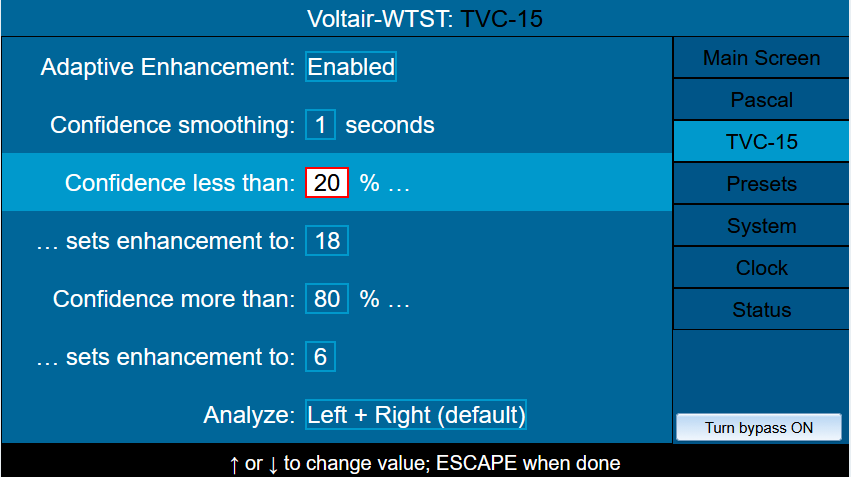
TVC-15 (first shipped in 2017 and now discontinued) was a completely separate product from the original Voltair, but could work in a complimentary fashion. It hosted an entirely different analysis engine that was capable of capturing watermark tones right off air or on any signal stream. Key parts of the original product are now integrated in Voltair II, providing the Adaptive Enhancement feature, a solution that can listen for watermarking tones, pushing for more enhancement when needed, and backing off when source material already supports strong encoding. In this respect, Adaptive Enhancement can be thought of as something of an automatic gain control (AGC) for Voltair Processing.
This screen lets you Enable TVC-15 Adaptive Enhancement, set confidence smoothing, Enhancement ranges and levels. The first line lets you Enable or Disable the Auto Enhance function.
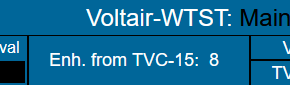
When enabled, the Main Screen will show a read-only indication that Enhancement is TVC-15 controlled. The current enhancement level (8 in our example) will update dynamically.
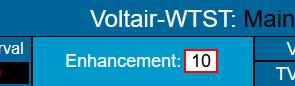
When disabled, Voltair Enhancement is set to a static value, selectable in the main screen.
Confidence smoothing: xx seconds
TVC applies a continuous, logarithmically decaying average to the individual 400ms symbol confidences it detects. The setting tells it how much weighting to apply to past symbols: effectively, how slowly the smoothed result changes based on new information. It uses the result to control the rest of the Automatic Enhance function.
Choose a duration between 1 and 20 seconds.
A short duration will react almost instantaneously to program changes. This can give you the fastest, tightest control over watermark enhancement. While the functions are totally different, you may think of smoothing as being similar to the attack and decay timings on an audio compressor.
For example, this drawing illustrates 2 second smoothing[^35]:
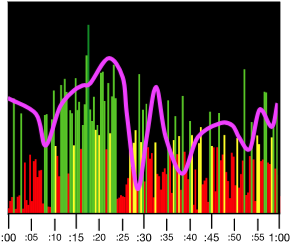
The thin vertical lines are individual 400ms confidence levels on the Main Confidence Graph. The horizontal scale is sixty seconds of continuous broadcasting. The thick purple line is the result of 2 second smoothing. It reacts tightly to the measured density of code symbols, but not so fast that Enhancement changes radically depending on talent’s individual syllables. It could be a good setting for a talk station.
Slightly longer settings may be appropriate for music formats where songs have spoken passages, for live concerts or sports that may be interrupted by short commercials, for talk shows that are interrupted by noise-like bursts of applause or similar sounds[^36], or for other situations where you want TVC to ignore momentary changes.
Control range pairs:
Smoothed Confidence of aa % or less…
…sets enhancement to bb
and
Smoothed Confidence of cc % or more…
…sets enhancement to dd
In these two pairs of controls, Smoothed Confidence refers to the result of TVC’s confidence analysis as processed through the Confidence Smoothing you’ve set. It’s a percentage, reflecting the most recent Confidence TVC has been able to measure, averaged with decreasing amounts of previous Confidences during the number of seconds specified.
These four controls work interactively. They determine when, and how much, TVC changes Voltair II’s Enhancement. They set the minimum and maximum enhancement levels, and where on the scale of confidence metrics increases or decreases are triggered. They’re best understood with a few graphs.
The first and third lines, Smoothed Confidence of nn %... , set the range TVC uses to adjust the Enhancement value. Within that range, TVC will make adjustments to Voltair II’s enhancement. When Confidence goes beyond that range, TVC freezes at the last enhancement value it calculated… until Confidence returns to being within the range.
If you couldn’t set the Smoothed Confidence range—that is, if TVC responded linearly to every change in the Smoothed Confidence, with no limits—you could graph its behavior like this[^37]:
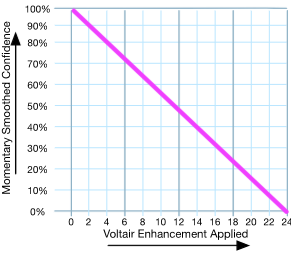
The vertical scale shows the Smoothed Confidence value, from zero to 100%. The horizontal is the amount of Enhancement that the TVC algorithm tells Voltair II to apply.
The slanted purple line shows a constant relationship across the whole range of confidence: at 100%, Voltair II applies zero Enhancement; at 50% confidence it applies 12 units of Enhancement; at zero confidence, Voltair II unleashes its full 24 units of Enhancement.
But in our experience, code symbols are more likely to fall into the middle of that range than at the extremes. We take advantage of that, squeezing more of the control activity into the center.
If we set Smoothed Confidence of 80% or less as a practical maximum, and Smoothed Confidence of 20% or more as a minimum, the graph now looks like this:
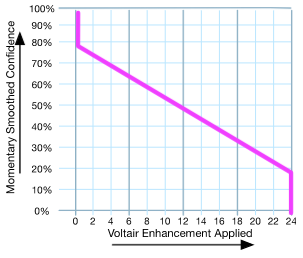
At any value of 80% or higher (vertical purple line on the extreme left), TVC sets Voltair II to minimum Enhancement. At any value of 20% or lower (extreme right), TVC sets Voltair II to the maximum.
In between (diagonal section), Voltair II responds with a full range of Enhancement values.
…sets enhancement to:
For a lot of programs, zero enhancement is never enough, and 24 enhancement is always too much. These “sets enhancement” adjustments are like Goldilocks: they let you specify “too little” or “too much” enhancement for your programming. TVC will then interpolate between your values as needed, to get enhancement that’s “just right”.
For example, let’s keep the two Smoothed Confidence settings at 80% and 20% as above.
We’ll apply enhancement limits of 18 at the lowest confidence, and 6 at the highest. Your screen would now look like this:
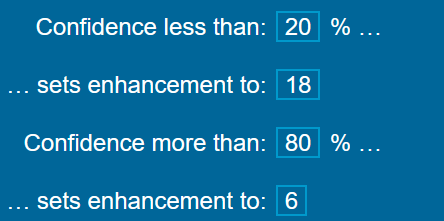
With these four settings, the graph looks like this:
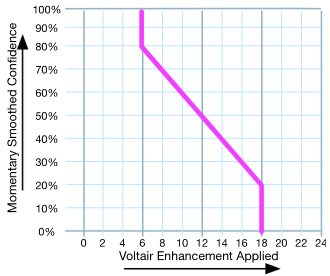
At any confidence of 80% or higher, AE has Voltair II apply 6 units of Enhancement. That minimum amount won’t bother listeners of most programming, but provides enough boost to enhance watermarks in moderate environments.
Between 20% and 80% confidence, AE sends Voltair II commands for more enhancement when it’s needed, and less when it isn’t.
But no matter how low the confidence gets, AE never specifies more than 18 units of Enhancement… a limit that should keep code symbols from becoming annoying in many formats.
That’s just for the example above, of course. You’ll be tuning your system to get the best results with your programming and your audience.
Bear in mind:
-
The Smoothed confidence of nn% or less… (upper pair) must be a lower percentage than the % or more… percent value.
-
The % or less …sets enhancement number should always be higher than the or more number.
This becomes intuitive when you understand how AE thinks. TVC also posts an error warning if you try to reverse these values.
Analyze: Left + Right vs L/R only sources
TVC-15’s analysis engine can be driven from summed stereo or mono sources. The system default is Left+Right, but experience has shown us that some types of music content contain unconventional mastering methods that contain high levels of out-of-phase information, particularly in the critical band ranges that Voltair II processes. In some cases, this content can misdirect TVC-15 as summed audio effectively cancels out codes used in analysis. To compensate for this, TVC-15 allows you to select only the Left or Right channel for analysis use.
These settings, together with TVC-15’s ability to quantify the confidence of each 400 ms. code symbol, give you unprecedented control over how robust your station’s watermarks are… with a minimum of listener annoyance!
The numbers in this manual are just a tutorial. They’re based on typical formats and circumstances, and your station should be anything but typical.
-
Use our numbers**[^38] only as a starting point.
-
Do your own fine-tuning.
-
Compare the results against your own judgment of air sound, and ultimately against your own ratings reports.
[^35]: It’s a very simplified figure. Our algorithms are more complex.
[^36]: Pink noise, large audience applause, and other constant sounds with significant midrange energy are much easier to encode than normal speech.
[^37]: These are also simplified graphs and numbers for explanation, not a detailed reflection of everything TVC does.
[^38]: We ship TVC features with default values of 1 second smoothing, a minimum enhancement of 6 if confidence reaches 80%, and a maximum enhancement of 18 if confidence falls to 20%. Those values are there simply as a starting point for your experimentation.